Galaxy Devlog #04 · Read the Galaxy build log
I was going to reuse the art from my first game.
The sprites already existed. I assumed moving them into Unity would be a copy and a paste.
Then I counted them. There were 895.
And once I actually started moving them, I found out that copying sprite files and getting them to animate correctly are two completely different jobs.
First I counted what I actually had
Measured on 24 August 2026.
The mode I have ported into Unity so far is 895 sprites, about 51.8 MB. Of those, 333 are cat sprites and 220 are monsters. The rest is background, effects and UI. The main game has a separate set of roughly 130 sprites at 26 MB.
At first I thought the problem was the number. It was not. The problem was that they did not agree with each other.
The same character is a different size in every action
Here are three sprites from one character, read straight off the GameMaker sprite editor.
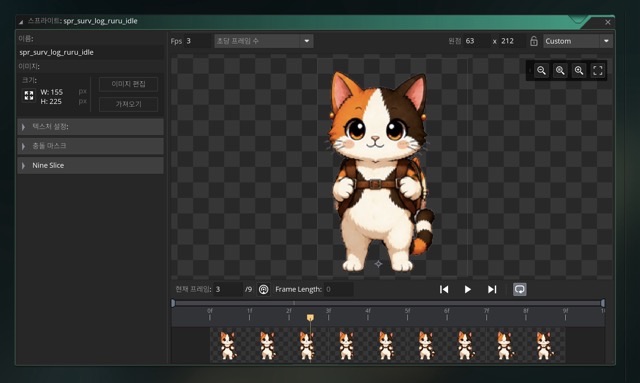
The idle animation: 155 by 225, origin 63,212, nine frames.
Idle is 155×225 with its origin at 63,212 and nine frames.
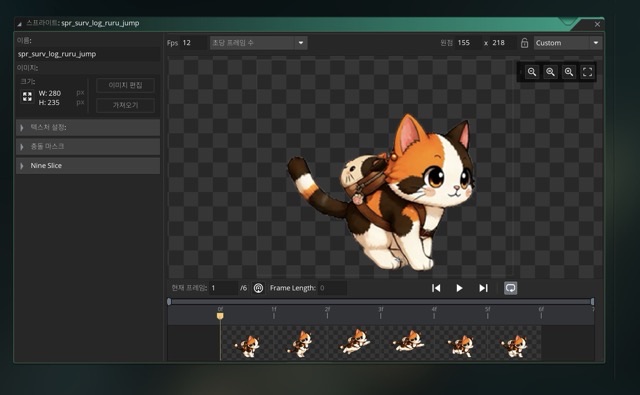
The jump animation for the same character: 280 by 235, origin 155,218, six frames.
Jump is 280×235 with its origin at 155,218 and six frames.
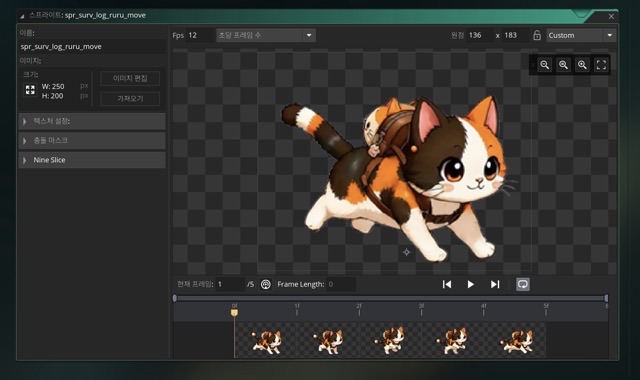
The run animation: 250 by 200, origin 136,183, five frames.
Run is 250×200 with its origin at 136,183 and five frames.
Same character. Three actions. Three different canvas sizes, three different origins, three different frame counts.
In GameMaker this never bothered me, because GameMaker stores an origin per sprite. That is the point the engine lines the sprite up by. I could let the canvas be any size and still say “keep the feet in the same place”, and the character walked normally.
Unity does not inherit that. If you bring the image files across and leave the origin behind, the sprite still looks correct standing still, and then the character bobs up and down as soon as the animation plays.
The first time I saw it I thought the import had gone wrong. It had not. I had moved the pictures and left the information about where those pictures belong.
The sprites I drew recently are fine
The main character art I made for this game is different. Twenty-seven frames, all 300×310, because I set a size before I started drawing.
Those import cleanly.
The trouble is that both kinds live in the same project. Some sprites are uniform, some are not, so there is no single import rule I can apply to all 895 of them.
Frame counts vary too
Counting the old animations, I found actions with 4, 5, 6, 7, 8, 9, 10 and 11 frames. On one character: nine frames standing, five walking, seven attacking.
I considered normalising everything to six or eight frames to make the import simpler. I decided against it. Changing the frame count changes playback speed and attack timing, which means changing how the game feels. The frame counts are the way they are because that is how the original plays.
So I wrote the sprites down instead
Managing 895 sprites individually in code was never going to work, so I built a table.
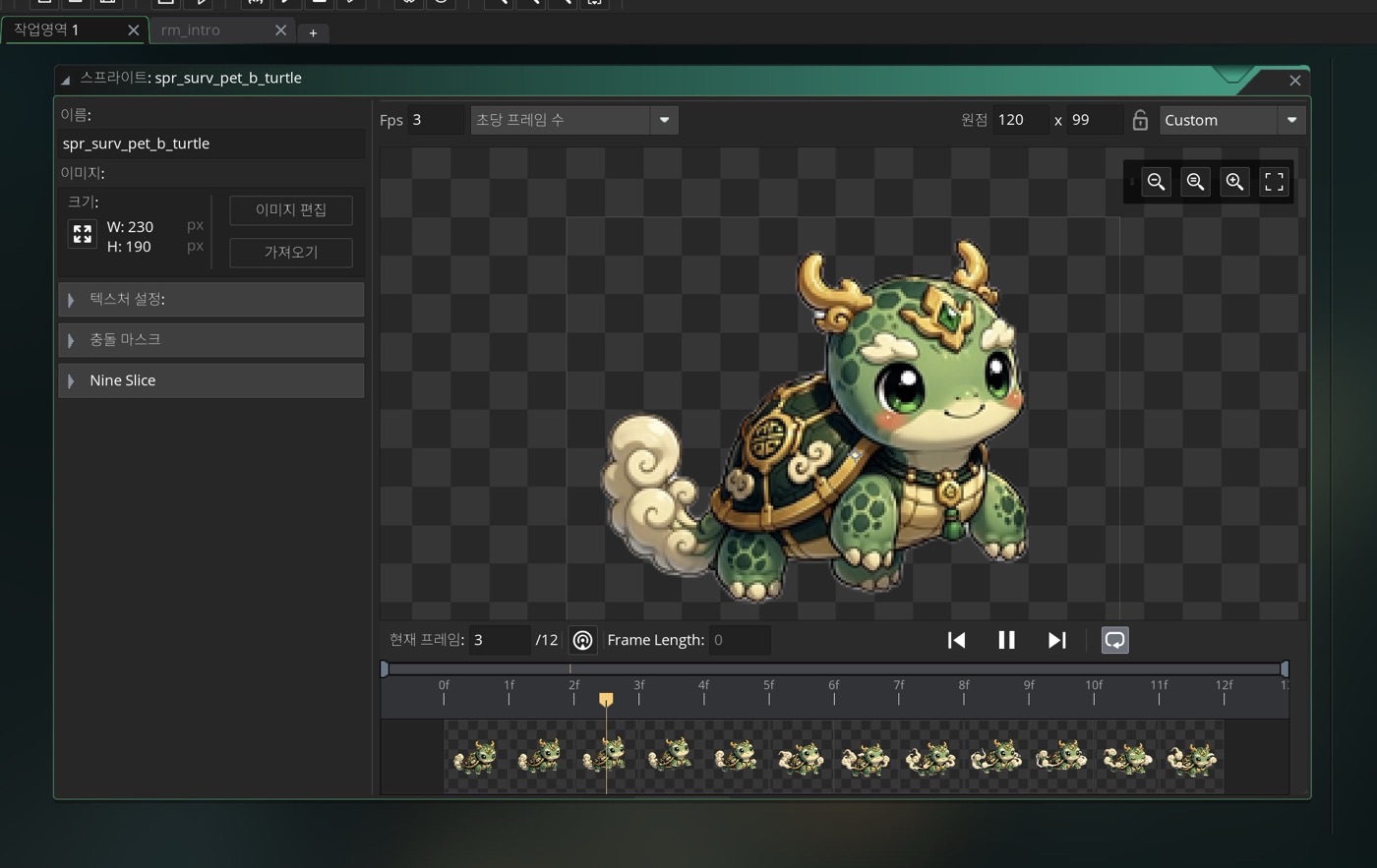
A pet sprite in the same editor: 230 by 190, origin 120,99, twelve frames at 3 fps.
The table holds, for each animation: its name, the folder it lives in, how many frames it has, the frame size, the origin, the playback speed, and the collision box. Every value came out of the original GameMaker project.
The code only knows a name. It asks for “cat walk” and the table answers with the frame count, the origin and the speed. None of that is written in the code.
The upside is that adding art no longer means editing code. I drop the files in and add one row.
The downside is the obvious one: if I add the files and forget the row, the game cannot find the sprite. So a missing row does not crash the game. It logs a warning and draws nothing, and I would rather lose one sprite than the whole build.
I looked at an AI sprite tool
There are tools now that take one drawing and generate walk, attack and directional animations from it. They remove backgrounds and split the result into frames. That is a real part of what I am currently doing by hand, so I went and checked whether it would fit.
Some of it fits well. Keeping the original character while generating new actions, cutting the background out, producing directional variants and mirroring them — all useful.
What did not fit was the output format.
My game stores animation as `walk_01.png`, `walk_02.png`, `walk_03.png` — one file per frame. The tool I looked at is built around packing all the frames into one large image and having the game cut rectangles out of it. That is a sprite sheet, and it is a completely normal way to build a game. It is just not the way this game is built.
I could rewrite my loading code to read sprite sheets. But adopting a tool to save work, and paying for it by rebuilding the part of the engine that already works, is not saving work.
There was a frame-count limit as well. My existing animations run from 4 to 11 frames, which does not line up with what the tool produces, so pushing 895 old sprites back through it was never realistic.
What I decided
Use the front half of the tool, not the back half.
Generate the action, remove the background, split it into individual frames — then stop. Rename the files to my own convention and add a row to the table. Nothing in the loading code changes.
The 895 sprites I have already moved stay exactly as they are. I will try the tool on new characters, not on the back catalogue.
I have not actually used it yet
I want to be exact about this, because it changes what this post is worth.
I have not run this tool on real production art. This is not “I tried it and it was great.” It is “I compared it against my project and this much fits, this much does not.”
There is also a practical thing left to verify: parts of it depend on being signed in to a particular AI service, so whether it works at all depends on the environment it runs in.
If you are about to port old art
Count three things before you copy a single file.
How many sprites there are. Whether the frame sizes agree. How many frames each animation uses.
If those numbers are uneven, a straight copy will not work, and you will need the origin values too — which means you need somewhere to put them.
I thought I was moving pictures. I was actually moving pictures, plus where each picture is anchored, plus how it plays.
The output format mattered more than the feature list
The other thing I took from this: when I look at a tool now, I read what it emits before I read what it can do.
A tool can be excellent and still hand you something your project cannot load. Then you rebuild your project to accept it, and the rebuild costs more than the tool saved.
So the question I ask first has changed. Not “what can this do”, but “can my game use what comes out of it, as is.”
Solo dev of Call the Cat, shipped after 178 days
on Google Play
and Steam.
Now building the sequel, Call the Cat: Galaxy, in public.